
Last updated — August 18, 2026
What cloud computing is and why it matters
Cloud computing means using computers and storage over the internet instead of owning and running them yourself. Think of it like renting space and power from a giant, remote computer center so you can run apps, store photos, or analyze data without buying servers. For students and future IT auditors, the cloud matters because most companies now run important parts of their business there — email, payroll, customer records, and even the artificial intelligence tools that help make decisions.
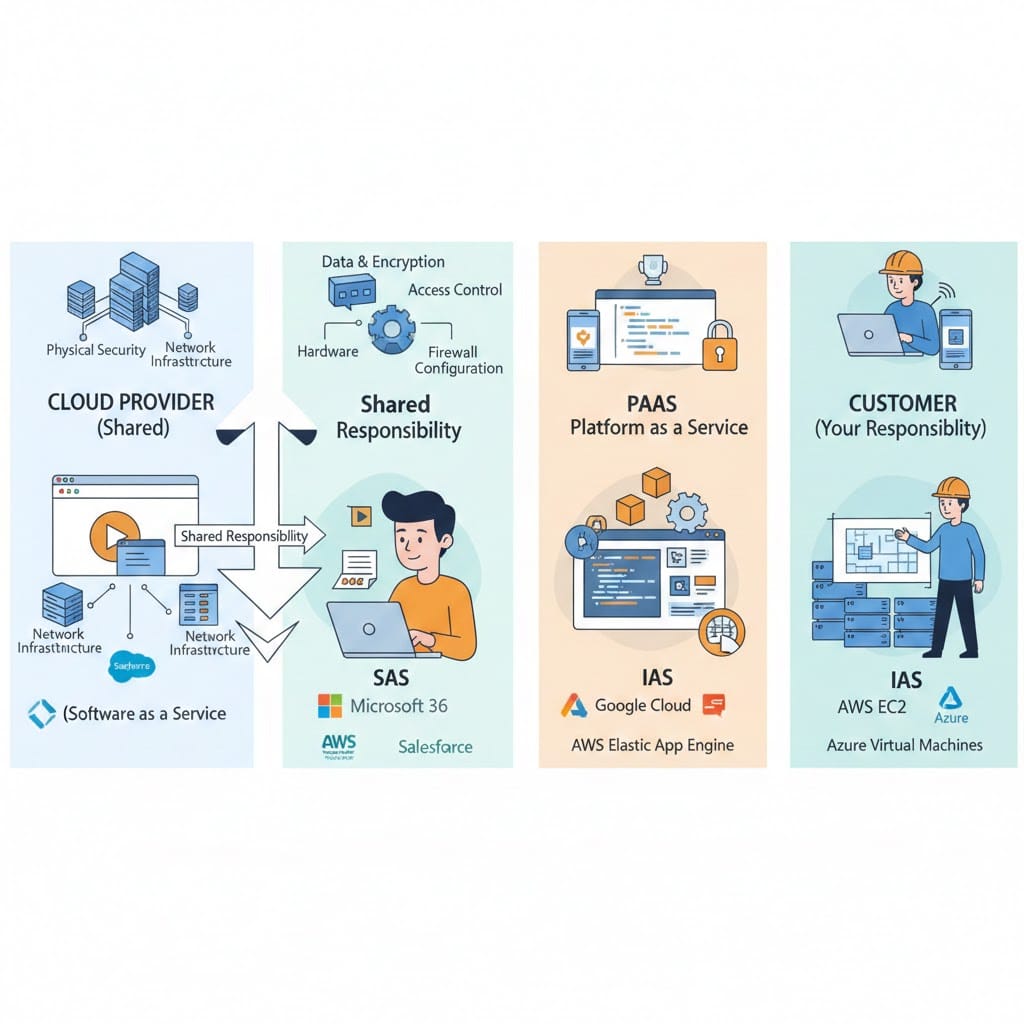
Auditors need to know two simple ideas. First, responsibility is shared: the cloud company looks after the physical machines and the network, while the customer (the business using the cloud) is responsible for how they set things up, who can access them, and what data they put there. Second, cloud systems can scale quickly — a small mistake can expose a lot of data fast. That makes prevention, monitoring, and clear rules more important than ever.
How companies use the cloud today
Companies use the cloud in several common ways:
- SaaS (Software as a Service): Apps like Microsoft 365, Google Workspace, and Salesforce run on the cloud. Companies subscribe and use them through a web browser. These apps often hold sensitive data like emails, contracts, and customer lists.
- IaaS and PaaS (Infrastructure and Platform as a Service): Businesses rent virtual machines, storage, and tools to build and run their own apps. Major providers are Amazon Web Services (AWS), Microsoft Azure, and Google Cloud. This is where you’ll find company websites, databases, and machine learning training.
- AI and machine learning services: Companies train and run AI models in the cloud because it offers powerful processors and easy scaling. This is used for things like chatbots, image recognition, and recommendation systems.
- Hybrid and multi-cloud setups: Many organizations use more than one cloud provider or keep some systems on their own servers. This spreads risk but also makes tracking and control harder.
Examples: a bank using Azure for customer portals, a retailer using AWS to run its online store and analyze sales, and a hospital using a SaaS electronic health record system to manage patient data.
The main risks auditors should focus on
Cloud systems introduce familiar risks but in new forms. Here are the ones auditors and students should understand:.
1. Misconfiguration
If a cloud setting is wrong — for example, a storage folder is left open to the public — sensitive files can be exposed. These mistakes are common because cloud systems have many settings and options.
2. Identity and access problems
If someone’s login is stolen or a user has more access than they need, attackers can move through the system and take data. Strong login checks and limiting what each person can do are key controls.
3. Data exposure and loss
Data can be accidentally shared, copied to the wrong place, or deleted. Backups, encryption (scrambling data so only authorized people can read it), and rules about where data can live help reduce this risk.
4. Weak monitoring and logging
If a company doesn’t collect and keep records of who did what and when, it’s hard to detect attacks or investigate incidents. Good logging is like having security cameras for digital systems.
5. Supply‑chain and AI risks
Using third‑party code, libraries, or prebuilt AI models can introduce hidden problems. If a model was trained on bad data or a library has a vulnerability, the company using it can be affected.
Simple steps companies need to take
For organizations that want to reduce cloud risk quickly, these actions give the most protection for the effort:
- Require MFA for all accounts that access cloud systems.
- Apply the principle of least privilege: give people only the access they need.
- Use automated tools to scan for misconfigurations and fix high‑risk issues fast.
- Encrypt sensitive data and manage encryption keys carefully.
- Keep centralized logs and test incident response plans regularly.
- Treat AI systems like any other system: document where training data came from and who can use the model.
What auditors should test and why
When auditing cloud systems, we focus on controls such as the ones below that stop big problems (risks) from happening and help detect them quickly.
- Map what’s in the cloud: Know which apps and data are in each cloud service. (If you don’t know what’s there, you can’t protect it).
- Check access controls: Verify that multi‑factor authentication (MFA) is used (this means a password plus another proof like a phone code), that users have only the permissions they need, and that admin accounts are tightly controlled.
- Review configurations: Look at storage, network rules, and identity policies. Automated tools can scan for risky settings.
- Inspect data protections: Confirm encryption is used, that sensitive data is classified (tagged so people know how to treat it), and that backups exist and are tested.
- Examine logging and incident response: Ensure logs are collected centrally, retained long enough, and that the company can respond to and recover from incidents.
- Assess third‑party and AI use: Ask for evidence about how vendors handle data and how AI models were trained and tested.
Why students should care
If you’re learning IT auditing or cybersecurity, cloud knowledge is essential. Employers want people who understand how to check cloud settings, review access controls, and investigate incidents in cloud environments. These are practical, high‑value skills that combine technical knowledge with judgment about risk.
Glossary of technical terms
Cloud computing
Using remote servers on the internet to store, manage, and process data instead of local computers or servers.
SaaS (Software as a Service)
Software delivered over the internet that users access through a browser or app (example: email services).
IaaS (Infrastructure as a Service)
Renting virtual machines, storage, and networks from a cloud provider to run your own software.
PaaS (Platform as a Service)
A cloud platform that provides tools and services to build and run applications without managing the underlying servers.
Multi‑cloud
Using more than one cloud provider (for example, both AWS and Azure).
Shared responsibility
The idea that cloud providers secure the physical infrastructure, while customers are responsible for their data, configurations, and user access.
Misconfiguration
A setting that is incorrect or unsafe, such as leaving a storage bucket open to the public.
Identity and Access Management (IAM)
Systems and policies that control who can access what in a cloud environment.
Multi‑factor authentication (MFA)
A security method that requires two or more proofs of identity, such as a password plus a code sent to a phone.
Least privilege
Giving users the minimum access they need to do their job.
Encryption
Turning readable data into a coded form so only authorized people can read it.
Logging
Recording events and actions in a system so you can review what happened later.
Drift detection
Finding when a system’s current settings differ from the intended or approved settings.
Infrastructure as Code (IaC)
Writing configuration files that define cloud resources so they can be created and managed automatically.
DLP (Data Loss Prevention)
Tools and rules that prevent sensitive data from leaving the organization in an unsafe way.
Model provenance
Information about where an AI model came from, what data trained it, and who modified it.
Blast radius
The amount of damage or exposure that would result if a system is compromised.
Appendix
Cloud audit checklist
| # | Control area | What to test | Evidence to collect |
|---|---|---|---|
| 1 | Scope & asset inventory | Confirm all cloud accounts, SaaS apps, IaaS/PaaS resources, and data stores are identified | Asset inventory; network diagram; SaaS subscription list |
| 2 | Shared‑responsibility | Verify provider vs. customer responsibilities in contracts and SLAs | Contract excerpts; responsibility matrix |
| 3 | Identity & access governance | Check MFA, role definitions, admin controls, and entitlement review cadence | MFA logs; role lists; access review reports |
| 4 | Least privilege | Validate users and service accounts have minimum required permissions | IAM policies; permission audit results |
| 5 | Configuration posture | Scan for public storage, open ports, overly permissive policies, and IaC issues | Posture scan report; IaC repo; remediation tickets |
| 6 | Drift detection | Confirm mechanisms detect and alert when live resources diverge from IaC | Drift alerts; change logs |
| 7 | Data classification & protection | Verify sensitive data is classified, encrypted in transit/at rest, and keys are managed | Data inventory; encryption settings; KMS policies |
| 8 | SaaS connectors & API access | Review OAuth apps, API tokens, and third‑party app permissions for excess access | OAuth app list; API key inventory; DLP rules |
| 9 | Logging & monitoring | Ensure centralized logging, immutable storage, alerting, and retention policies | Log aggregation config; alert history; retention settings |
| 10 | Incident response readiness | Confirm cloud scenarios in IR playbooks and ability to preserve forensic data | IR plan; tabletop notes; forensic checklist |
| 11 | Backup & recovery | Validate backups are isolated, encrypted, and restore tests are performed | Backup schedules; restore test results |
| 12 | Third‑party & AI/model risk | Assess vendor attestations, data handling, and model provenance/access controls | Vendor SOC reports; model documentation; contracts |
| 13 | CI/CD & change control | Review pipeline access, secrets management, and automated security checks | CI/CD policies; secrets vault usage; pipeline logs |
| 14 | Network segmentation | Validate virtual network rules, private endpoints, and least‑exposure design | VPC/subnet diagrams; firewall rules; ACLs |
| 15 | Cost/usage monitoring | Check for unexpected spikes and confirm resource tagging for ownership | Cost reports; resource tags; anomaly alerts |
| 16 | Training & governance | Confirm staff training and that cloud security policies are current and enforced | Training records; policy documents; exception logs |