
Last updated — August 18, 2026
Group Policy is the organization’s rulebook for Windows computers and users inside an Active Directory network. Administrators write rules once and those rules automatically apply to many machines and accounts. For an IT auditor or other risk professional, the most important idea is that Group Policy controls computer behavior for a large number of users. That makes it a powerful security control, but also a single point of failure: a wrong setting can affect hundreds or thousands of users instantly.
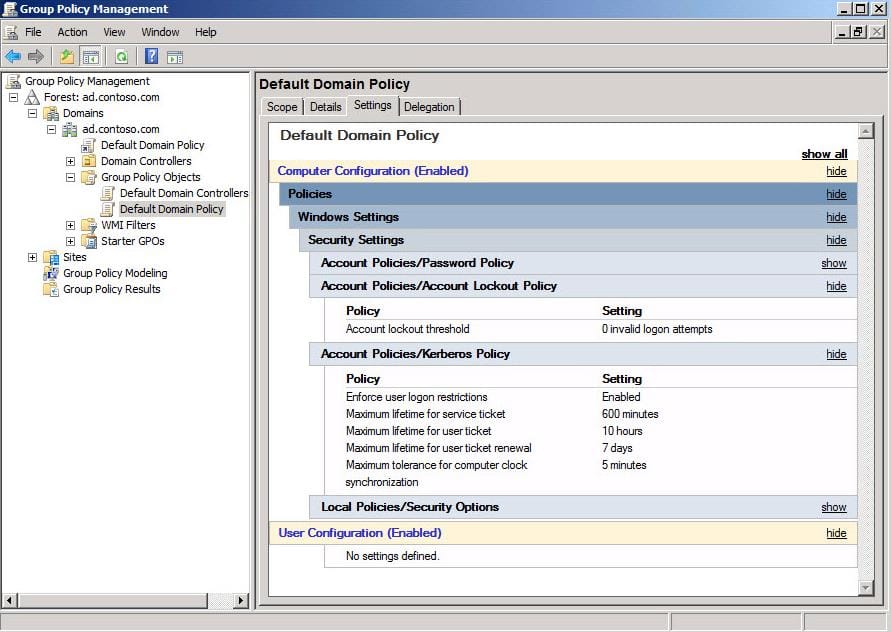
Imagine a company where Group Policy is used to require strong passwords, turn on disk encryption, block risky websites, and stop users from installing unapproved software. Those policies reduce risk by making it harder for attackers to get in and by limiting what users can do that might cause harm. For example, a policy that enforces complex passwords lowers the chance that someone can guess an account. A policy that redirects user documents to a central server makes sure important files are backed up and not lost when a laptop breaks.
But Group Policy can also create big risks when it’s mismanaged. Picture a GPO (Group Policy Object) that accidentally disables antivirus or opens a wide firewall port across the domain. That single mistake could make every computer in the company vulnerable. Or imagine many people have the ability to change GPOs without oversight. One careless change, or a compromised admin account, could spread malware or expose sensitive data across the whole network.
From an auditor’s point of view, the main risks to watch for are: too many people with powerful rights, poor change control, lack of monitoring, undocumented policies, and outdated or conflicting settings. Controls that reduce those risks are familiar ideas: limit who can edit policies, require approvals and testing before changes go live, log every change, and review policies regularly. In other words, treat Group Policy like any other critical system: apply separation of duties, version control, and audit trails.
Let’s look at a few more concrete examples to help make this practical. Suppose an admin creates a GPO that allows remote desktop access for troubleshooting. If that GPO is linked too broadly, attackers could use it to reach many machines. A control here would be to restrict who can link that GPO and to require multi‑factor authentication for remote access.
Auditors should also be aware of outdated settings and software. For years, Group Policy included many settings for Internet Explorer. Today, organizations use modern browsers like Microsoft Edge, and old IE settings may be irrelevant or even risky if they allow outdated behaviors. Part of auditing Group Policy is spotting these stale settings and cleaning them up so they don’t create confusion or hidden vulnerabilities.
Monitoring and logging are essential. Good environments log who changed a GPO, when, and what changed. Those logs should be kept in a secure place and reviewed regularly. If an unexpected change appears, the organization should be able to trace it back, roll it back, and understand whether it was malicious or accidental. Backups of Group Policy objects and a tested recovery plan are also important — if a GPO is corrupted or deleted, you want a reliable way to restore it.
Another control is testing. Changes to Group Policy should be tested in a small, isolated part of the network before being applied broadly. This reduces the chance that a setting will have an unexpected, harmful effect. Change requests should include a description of the risk, a rollback plan, and approval from someone who understands security implications.
Delegation and least privilege matter a lot. Not everyone needs the ability to create or edit GPOs. Give people only the rights they need. Use role separation so that the person who requests a change is not the same person who approves and applies it. For emergency situations, companies should have a documented process for temporary elevated access that is logged and reviewed afterward.
From a compliance perspective, Group Policy is often where technical controls required by standards are enforced. Password complexity, account lockout, encryption, and software restrictions are all things auditors look for. When auditing, auditors compare Group Policy settings to the organization’s policies and to external standards (for example, check that password rules in Group Policy match the written password policy). Also, IT auditors check that policies are applied consistently across the environment and that exceptions are documented and approved.
Finally, think about the human side. Training and awareness reduce risk. Admins should understand the impact of the settings they change. Regular reviews and cleanups prevent the policy environment from becoming a messy tangle of overlapping rules that are hard to understand and audit.
In short, Group Policy is a central control that can greatly reduce IT risk when it’s well managed. For an IT auditor or a student learning about IT risk, the key questions are: who can change policies, how are changes approved and tested, how are changes logged and reviewed, are critical settings enforced consistently, and can the organization recover from a bad change? If those questions have strong, documented answers, Group Policy is working as a good control. If not, it’s a risk that needs attention.